Developer field guide
AI Agents vs Workflows: How to Choose the Right Architecture
The best AI application is not always the most autonomous one. Here’s how to choose between a predictable pipeline and a tool-using agent—and what to measure before you ship.
The short answer
Use a workflow when you know the steps in advance. Use an AI agent when the next step depends on what the model discovers. Start with the simplest approach that works, then add autonomy only where evaluation shows it helps.
What is the difference between AI agents and workflows?
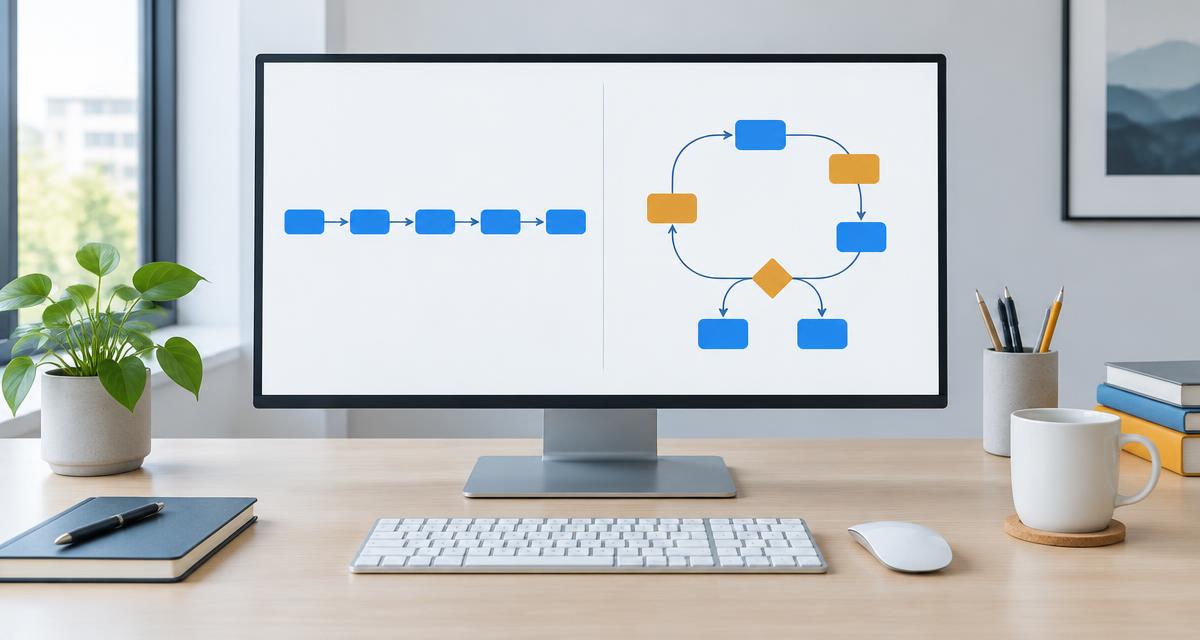
An LLM workflow uses a predefined path: your code decides when to retrieve documents, call a model, validate an answer or send a result. A workflow can still include branching, parallel calls and multiple models. “Fixed” describes who controls the orchestration, not whether the output is deterministic.
An AI agent gives the model more control over the sequence. It observes the task, chooses a tool, reads the result and decides what to do next. That loop continues until it reaches a stopping condition or hands the task back to a person. Anthropic’s Building effective agents uses this distinction between predefined code paths and model-directed processes.
Neither approach guarantees correctness. A workflow can produce a confident wrong answer; an agent can choose an unsuitable tool. Autonomy changes the engineering problem: you must now validate both the answer and the path taken to reach it.
When should you use a workflow or an agent?
| Decision | Workflow | Agent |
|---|---|---|
| Task shape | Known steps, repeatable inputs | Unknown steps, discovery needed |
| Control | Code selects the path | Model selects actions within limits |
| Cost and latency | Often easier to bound | Can vary with tool calls and retries |
| Good starting task | Extract fields from invoices | Investigate a ticket across several sources |
If a single prompt or retrieval-augmented generation (RAG) call solves the problem reliably, stop there. If the problem needs a repeatable sequence, build a workflow. Consider an agent when hard-coded branches become brittle because the task requires open-ended investigation.
These are not mutually exclusive. A useful hybrid is an agent for read-only investigation inside a workflow that controls approvals, validation and final delivery. Complexity is a cost, not a feature.
A worked example: a customer-support assistant
Imagine a customer asks: “My order shows delivered, but I haven’t received it. What can you do?” The following is a proposed design, not a claim about a deployed product.
Option A: a workflow
Your application verifies the customer’s identity, retrieves their order, checks delivery status, retrieves the relevant policy and asks the model to draft a reply. Code then checks that the draft references the right order and routes it to a support representative. Each step has an explicit input and output.
Option B: an agent inside that workflow
A read-only agent can decide whether it needs the carrier’s tracking history, a previous support conversation or a policy search. Tool results become context for its next decision. It might discover that a replacement already exists and avoid recommending a duplicate.
The agent should not gain unrestricted refund or order-editing access. Keep those actions behind server-side authorization and an explicit approval step. The application—not the model—enforces ownership checks and permissions. If evidence is missing or tools fail, hand the case to a person rather than inventing an explanation.
What to check before putting an agent in production
- Limit tool permissions. Separate read tools from write tools. Validate every argument and authorize every request outside the model.
- Treat retrieved text as untrusted. A document, email or tool result can contain prompt injection. It must not be allowed to rewrite system instructions or grant itself access.
- Set stopping conditions. Bound tool calls, elapsed time and spending. Define what happens when the agent reaches a limit.
- Require approval for consequential actions. Payments, deletions and externally sent messages deserve explicit controls, not just a sentence in a prompt.
- Inspect traces without exposing private data. Record tool choices, failures and outcomes; redact sensitive content and define retention limits.
OpenAI’s practical guide to building agents discusses tools, guardrails and human intervention. Use guidance like this as a starting point, not a substitute for testing your own threat model.
Measure outcomes, not impressive demos
Compare a workflow baseline with your agent on the same representative cases. Track task success, unsupported claims, unauthorized-action attempts, handoffs, tool failures, latency and cost per completed task. Include ambiguous requests, malicious retrieved text and unavailable tools. A fluent reply is not evidence that the correct task was completed.
Your next build: test whether autonomy earns its place
Build a small assistant using fictional support tickets and a local policy document. First implement a fixed retrieve → draft → validate workflow. Then give a second version a read-only policy-search tool and let it decide whether another search is necessary.
Run both versions on the same cases. Which answers cite the right policy? Which ask for missing information? Does extra searching actually improve the result, or just make it slower? Write down where the agent wins and where a simple workflow is more dependable.
Interview takeaway: explain the trade-off, not just the framework. A strong design answer names the task, justifies autonomy, defines permissions and describes how success is measured.
Continue interview preparationCommon questions about AI agents
Is RAG the same as an AI agent?
No. RAG retrieves information to ground a model’s response. It can be one step in a fixed workflow or a tool that an agent chooses to call. Retrieval alone does not create autonomous orchestration.
Does MCP make an application an agent?
No. The Model Context Protocol standardizes connections between AI applications and external tools or data. It does not itself decide which actions to take, enforce your business permissions or guarantee safe results.
Do I need several agents?
Not necessarily. Start with a single model call, workflow or agent. Add multiple agents only for a specific coordination need that your evaluations show improves the outcome enough to justify the added complexity.